2234
Aspose.Cells For Android
Key Features
Advanced Features
Unlike similar products from other vendors, Aspose.Cells for Android not only supports spreadsheet generation and other basic file formatting features, it also supports a number of advanced features. These advanced features make it much easier for developers to manipulate spreadsheet contents, cell formatting and file protection. Aspose.Cells for Android includes the following features:
- Ability to save and open Excel files to and from streams
- Send output to a client browser
- Import and export data from an Array, ArrayList and Recordset
- Import images and charts
- Create images and charts through the product API
- Import formulae from a designer spreadsheet
- Configure page setup through the product API
Aspose.Cells for Android also supports Addins, VBA and macros. As well as this, there are also a number of unique features that developers will only find in Aspose.Cells for Android such as:
- Support of the CSV format
- Add a copy of an existing worksheet (with full contents, images and charts etc.) to a new file
- Create comments
- Auto-filters and page breaks through the product API
- Set complex formulae
- Support conditional formatting
- Support protection options introduced in Microsoft Excel XP
- Manipulate named ranges
- Create PivotTables through the product API
- Save as HTML files or streams
- Support custom charts through the product API
- Formula calculation engine
- Many many more!
Platform Independence
Aspose.Cells for Android together with Aspose.Cells for .NET and Aspose.Cells for Java cover the main development environments and deployment platforms in common use today. Aspose.Cells for Android is available for Android OS above Android 4.0.
Flexible Display Options
Aspose.Cells for Android gives you complete control over page setup and allows you to manipulate a wide range of display options such as; preview page breaks and set default zoom level for the Worksheet, control data visibility using Freeze Panes, set page orientation, scaling, paper size, headers/footers, and print area etc.
Security Features
Aspose.Cells for Android offers a wide range of security features such as; support for Excel 2007 XLSX file encryption and decryption, protect Contents, Objects and Scenarios of a Worksheet and hide or unhide a Worksheet.
Manipulate Rows And Columns
Aspose.Cells for Android allows you to manipulate Rows and Columns in many different ways. You can easily adjust Row height and Column width as required, auto size the width/height of cells according to contents, insert or delete, hide or unhide and group or ungroup Rows and Columns.
Data Management
Aspose.Cells for Android provides extensive support for data management. You can easily manipulate any Cell in the Worksheet at runtime, import data into Worksheets from different data sources and export cells data to a DataTable.
Comprehensive Formatting Support
Aspose.Cells for Android gives you absolute control over how your data is presented by offering advanced formatting features. You can apply formatting to a Worksheet, Row, Column and Cell. You can also add Rich Text to a Single Cell and apply different Borders, Background Patterns and Fonts. Conditional formatting can also be applied to Cells.
Creating Charts
Aspose.Cells for Android comes with complete support for charting and supports all standard chart types. You can easily add customized charts using the products API and dynamically set data for the charts. Aspose.Cells for Android also allows you to convert charts to images.
Support For Many Different File Formats
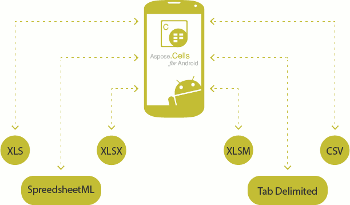
Using Aspose.Cells for Android, developers can easily open and save a multitude of file formats. These include:
- Excel 97 / 2000 / XP / 2003 / 2007 / 2010 (XLSX/XLSM)
- SpreadSheetML
- Tab Delimited
- CSV
- Tab Delimited
- HTML
Status:
Contact Us for Special Price
Manufacturer:
 Aspose
Reference URL:
http://www.aspose.com/android/excel-component/key-features.aspx
Note: Product information provided above is for reference only. For the detail of the product, please help to visit manufacturer's web site for more information.

