1915
Infowise Smart List Pro
Instantly turn your SharePoint lists into full-fledged systems using tab and column permissions, custom input validation, view permissions and much more
- Tabs and Tab Permissions – Why give permissions to each and every column? Group columns into tabs (or groups) and assign permissions directly to each tab, such as Edit, View or Deny (hidden), depending on user, form or conditions, and specify default tab for any user/group.
- Advanced Column Permissions – Precise control over each column, overriding tab permissions. List manager can grant different permissions to users on columns, optionally depending on values of other columns of the item. The permissions can be set to be read-only, read/write or hide column.
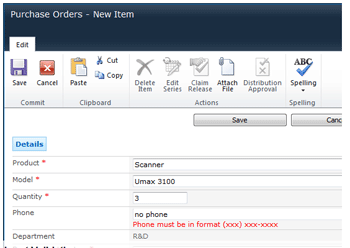
- Column Value Validation – The list manager can provide the ability to validate input while editing items. Validations can be in the form of regular expressions, string length, or in relation to values of other columns. A certain validation rule can be set to be activated only when certain conditions apply to the item.
- View Permissions - Permissions can also be set on list views, different default views can be set for different users.
- Default Values – Smart List Pro provides the ability to set initial values in fields for new items, and associate different values to different groups of people.
- Wizard-driven multi-step form filling
- Support for mobile tabs - using Smart List Mobile create special tabs for your mobile devices
- Create alerts for specific tabs using Smart Alert Pro
- Support for site and list templates - your settings are packaged and can be recreated in a new list/site
- Multilingual - all languages are supported, full localization for English, French, German, Swedish, Russian and Spanish!
狀況:
聯絡我們查詢特別售價
生產商:
 Infowise
參考網頁:
http://www.infowisesolutions.com/product.aspx?id=SmartListPro
注意:以上所提供的產品信息,僅供參考。對於產品的細節,請遊覽製造商的網站作更詳細了解。
