1910
TX Spell .NET for Windows Forms
Reliable and Accurate Spell Checking
Using TX Spell .NET for Windows Forms you can add extremely fast, highly reliable and very accurate spell checking to your TX Text Control based applications.
- Built-in support for Hunspell dictionaries. (American English shipped as standard).
- Spell check multi-lingual documents.
- Build user dictionaries.
- Really easy-to-use API.
Spell-as-you-type
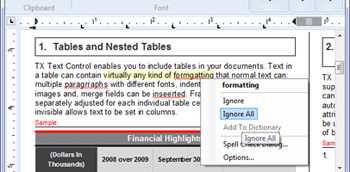
Words that are not in the selected or user dictionaries are underlined using wavy red lines. TX Spell .NET for Windows Forms persistently checks spelling as you type, word by word, and as you copy and paste. Right-clicking on a spelling mistake presents a context menu with suggestions and options to Ignore All or Add to user dictionary.
User dictionaries
Unrecognized words and specialist vocabulary, such as legal or medical terms, can be added to a user dictionary. To assist end-users maintain their user dictionaries, TX Spell .NET for Windows Forms ships with a user dictionary editor:
Integrated dialog box
Using the integrated dialog box, you can see which words are incorrectly spelled, replace the word with one of the suggestions, ignore the spelling mistake just this once, or ignore it completely.
Multi-lingual spell checking
Unlike most spell checkers, TX Spell .NET for Windows Forms supports multi-lingual documents. For example, it is possible to check a document, which contains English, German, French and Spanish text without having to manually switch between dictionaries.
Seamless integration into TX Text Control
TX Spell .NET for Windows Forms was developed by the same team of engineers, which maintains TX Text Control. Hence, the spell checking component enjoys a deep integration within the main word processing component. Integrating TX Spell .NET for Windows Forms into TX Text Control requires no code - it can be easily connected using the Visual Studio designer:
Multiple TextControls, one spell checker
Using TX Spell .NET for Windows Forms, it is possible to perform spell checking on multiple TextControls on a single form. It is not necessary to have one instance of the spell checker, for each instance of TextControl. This dramatically reduces the required memory and speeds up the spell checking process.
狀況:
聯絡我們查詢特別售價
生產商:
 TX Text Control
參考網頁:
http://www.textcontrol.com/en_US/products/spelldotnet/overview/
注意:以上所提供的產品信息,僅供參考。對於產品的細節,請遊覽製造商的網站作更詳細了解。
